Automation Hub
Recruiting that runs itself
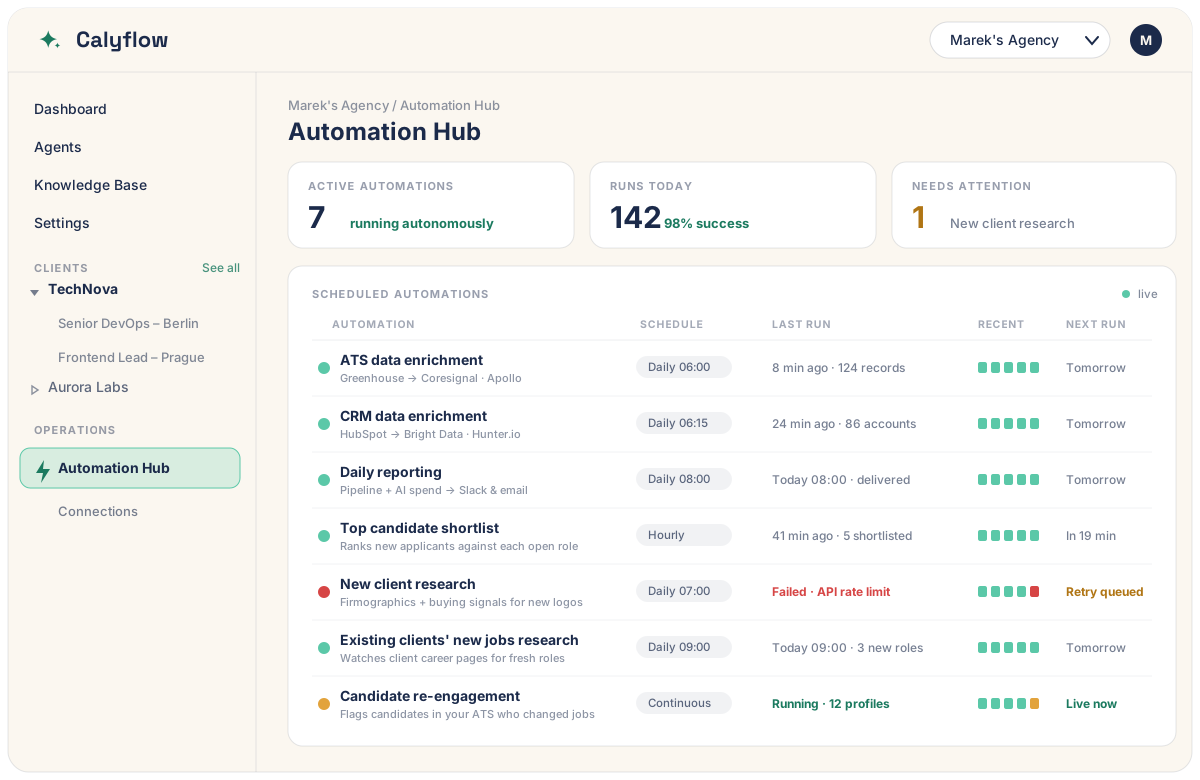
Beyond one-off workflows: the Automation Hub runs highly customized AI agents on a schedule — enriching your data, researching clients, shortlisting candidates, and preparing documents, autonomously.
Custom-built for your agency · Runs on your own AI & keys
Why automate
The work that happens without you
A workflow gives one person one good output when they run it. An automation gives your whole agency that output every day, whether anyone remembers to or not.
Connect every data source
Agents reach into your ATS, CRM, data providers, and tools in one run — reading and writing where your data already lives, instead of you copy-pasting between tabs.
Enrich data while you sleep
Fresh job titles, verified emails, firmographics, and job-change signals land in your systems every morning — no manual research, no stale records.
Prepare documents automatically
Shortlists, screening reports, client research briefs, and daily summaries are drafted and filed before your team logs in, ready to review and send.
Highly customized AI agents
Each automation is an AI-powered agent tuned to your agency — your sources, your rubric, your tone of voice, your schedule. Not a generic integration.
Runs on your own AI and keys
Every agent runs on your own models, data, and tool accounts. The work — and the spend — stays yours, with a clear cost shown on every run.
Always-on, never forgotten
Hourly, daily, or continuous — automations fire on time, every time, with health states and run history so nothing silently breaks.
Examples
Automations agency owners actually run
A starting set — every hub is tailored, so yours can do whatever repeats in your agency.
ATS data enrichment
Refreshes candidate records daily from your data providers — current role, employer, verified contacts.
CRM data enrichment
Keeps client and contact records current: firmographics, decision-makers, and direct dials.
Daily reporting
A morning digest of pipeline movement, placements, and AI spend, delivered to Slack or email.
Top candidate shortlist
Ranks new applicants against each open role and surfaces the strongest fits, hourly.
New client research
Builds a firmographic + buying-signal brief on every new logo before your first call.
Existing clients' new jobs research
Watches your clients’ career pages and flags fresh roles you could be filling first.
Candidate re-engagement
Detects when people in your ATS change jobs, so you reach out at exactly the right moment.
Inbox & lead triage
Sorts inbound applications and enquiries, enriches them, and routes each to the right project.
How it works
From manual chore to autonomous agent
We build, you approve, then it runs on its own — with the visibility to trust it.
Connect your stack
We wire the hub to your ATS, CRM, data providers, and tools — on your own accounts and keys.
Customize the agents
Each automation is built to your rubric, sources, and tone, then tested against your real data.
Schedule & forget
Set them to run hourly, daily, or continuously. They fire on time without anyone pressing go.
Monitor at a glance
The hub shows green/red health, run history, and cost — so you trust it, and catch the rare failure fast.
Build your Automation Hub
Tell us what your team does on repeat
On a 30-minute call we will map the chores worth automating, the data sources to connect, and what each agent should produce — then scope a hub built for your agency.
30 minutes · No commitment · Runs on your own AI & keys